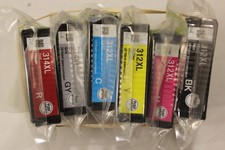
5 410XL T410XL Ink Compatible With Epson XP-830 XP-630 XP-7100XP-530 XP-635
Check the listing for details.





| Location | Walnut, California US |
| Shipping | Free shipping (check listing for details) |
| Seller |
easy-life6
99.5% positive · 3303 feedback
|
| Listing | FixedPrice · Active |
| Return shipping will be paid by | Seller |
| All returns accepted | Returns Accepted |
| Item must be returned within | 30 Days |
| Brand | Unbranded |
| Type | Compatible |
| Model | for 410 T410 410XL 410 XL T410XL |
| Color | Cyan |
| Compatible Brand | For Epson |
| Print Technology | Inkjet |
| Compatible Model | Compatible for Epson 410XL |
| Manufacturer Warranty | 3 Years |
| Compattible Printer | for Expression XP-530, XP-630, XP-635, XP-640, XP-830, XP-7100 |
| Page yield | Up to pages 500 per Black, 650 per Photo Black, 650 per Color |
| MPN | 410XL T410XL 410-XL |
| Unit Quantity | 5 |
| Unit Type | Unit |
Ink Cartridge for Epson 410XL T410XL 1. Product: Ink Cartridge 2. Item condition:
Brand New 3. Compatible Brand: Compatible for Epson (NOT Genuine) 4. Package Include: 1x Black, 1x Photo Black, 1x Cyan, 1x Yellow, 1x Magenta 5. Page Yield: 650 pages per 410XL Black, 500 pages per 410XL Color at 5% coverage of A4 paper (XL version) 6. High capacity and excellent performance. Excellent print quality for lively, color-fast texts and graphics Instruction Steps: Step 1: Tear off the yellow label Step 2: Insert the cartridge into corresponding printer slot Step 3: Tips: 1. Don't remove the transparent film from the ink outlet 2. Don't touch the chip Advantages: 410XL ink cartridges for epson printer is fast-drying ink and Brilliant prints on both plain and glossy paper, resists fading and smudging 1. Please make the cartridge upside down, wait for 2 minutes, remove the orange protective clips carefully, and install the cartridge into printer. 2.The computer would appear Non-Genuine, please click Yes continuously, then the printer can go on to print. 3. If cartridge not recognized by printer, remove the cartridge carefully, gently wipe the contact points on the printer with a moist, lint free, soft cloth. Then re-install. 4. If line or blurry happens, Pls run a print cartridge cleaning and re-alignment function.