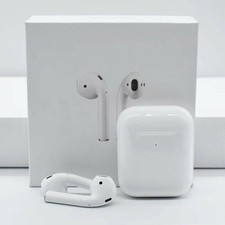
Apple AirPods Pro (1st Gen)A2084 Left Earbud Replacement - Bluetooth Earphone
Check the listing for details.


| Location | Natick US |
| Shipping | Free shipping (check listing for details) |
| Seller |
xiao7681
98.6% positive · 210 feedback
|
| Listing | FixedPrice · Active |
| Start time | 2026-02-01T15:51:58.000Z |
| Number of Earpieces | Single |
| Color | White |
| MPN | A2084 |
| Brand | Apple |
| Form Factor | In-Ear Only |
| Type | Canal Earbud (In Ear Canal) |
| Unit Type | Unit |
| Wireless Technology | Bluetooth |
| Model | Apple AirPods Pro |
| Connectivity | Bluetooth |
| Features | Active Noise Cancellation, Call functions, Sweat-Proof, Waterproof, Wireless, Wireless Charging, • Transparency Mode, • High-Quality Audio |
| Microphone Type | Built-In |
| Charger Included | No |
| Unit Quantity | 1 |
Apple AirPods Pro (1st Generation) Left Earbud (A2084) - Excellent ConditionPerfect Replacement for Your AirPods ProCondition:Open box, thoroughly tested and inspected.Functionally and cosmetically comparable to new.Key Features:Active Noise Cancellation (ANC)Transparency ModeHigh-Quality AudioSweat & Water Resistant (IPX4)Built-in Microphone for calls and Siri accessCustomizable In-ear Fit with silicone tips for all-day comfortCompatibility:Works with 1st Gen Apple AirPods Pro cases and right earbuds (charging case and right earbud not included).Charging Information:No charging case included; compatible with Apple AirPods Pro charging case.Serial Number:Available upon request for verification.Instruction for Pairing:On your iPhone/iPad, go to Settings > Bluetooth and tap the information button next to your AirPods.Tap Forget This Device, then confirm.Place both AirPods in the charging case and open the lid.Press and hold the setup button on the back of the case until the status light flashes amber.Wait for the status light to flash white, then go to the Home screen on your iPhone/iPad.Open the case near your iPhone/iPad and follow the on-screen setup instructions.If the status light flashes amber, connect to power and wait 20 minutes before retrying.Shipping & Returns:Shipping time: 2-5 days depending on warehouse location.Returns: Accepted within 30 days of delivery.Contact Us:If you have any questions, feel free to message us via eBay.We’re a U.S.-based seller and respond promptly during business hours.Bulk orders and business inquiries welcome.📌 Shipping Notice Please note that shipping to Alaska, Hawaii, and Puerto Rico requires separate shipping calculation due to carrier limitations. Kindly contact our customer service before placing your order to confirm shipping cost and delivery options. Orders placed without prior confirmation may be delayed or canceled. Thank you for your understanding!


![[New] Original OEM Apple iPhone Wired 3.5mm Headset Earbud Headphones](https://i.ebayimg.com/images/g/WekAAeSw7NhpKKzT/s-l225.jpg)