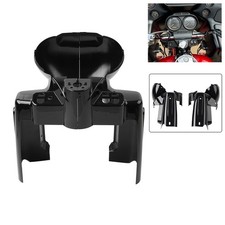
Honda CBR600RR 2003-2009 Gear Indicator Speed Display Meter, 1-6
This Honda CBR600RR 2003-2009 gear indicator speed display meter is designed to show the current gear position from 1 to 6 along with a speed display. The item is listed as New and is suitable for riders looking to add a clear, easy-to-read gear indicator to their motorcycle. Free Shipping is included, which can help keep the total cost predictable at checkout. Installation requirements, fitment notes, included accessories, and display details are not provided here—check the listing for details.


| Location | Guangzhou CN |
| Shipping | Free shipping (check listing for details) |
| Seller |
tmqv4959
97.9% positive · 715 feedback
|
| Listing | FixedPrice · Active |
| Return shipping will be paid by | Buyer |
| Returns Accepted | Returns Accepted |
| Item must be returned within | 30 Days |
| Refund will be given as | Money Back |
| Brand | Unbranded |
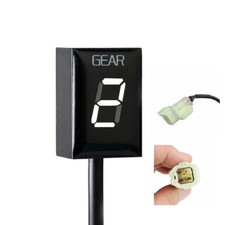
Welcome to our store! Fitment For Honda CBR600RR 2 003-2009 ( Before you submit the order, please confirm that is suitable for your motorcycle. ) Description Condition: 100%
Brand New, High Quality Material: Plastic Color of Light Source: Red Size: 4cm*4cm*4cm/1.57inch*1.57inch*1.57inch Package: 1 x Motorcycle Speed Gear Display ( As the picture. ) ▲Feature: Shows current gear number Indicates current gear from 1 to max of 6. as well as a neutral indicator. Detects the current gear faster than other gear indicators that use speedometer/tachometer signal. Display can be mounted anywhere ▲Installation: Find the RED,4-pole male diagnostic connector(DLC), usually near the ECU box,It may have a removable cap and may be partially covered by black tape. ▲Steps: -You need to setup the module after installation. When ignition is turned on, the display counts backwards (6 to 1) indicating that the memory is clear. -Raise the rear wheel off the ground by using a stand, and start the engine in Neutral. (If you do not have a stand, you may setup the unit while riding. Find a long, straight road with light traffic.) -the screen displays L, indicating that learning is started. - The screen displays L, select first gear, release the clutch, and keep the speed higher than the idle speed. - The display will flash "1". Continue to maintain the first gear, accelerate. When the device is learning a gear, the display flashes faster. - When the display shows "2", select the second gear and continue to accelerate. - When the display shows "3", select the third gear and continue to accelerate. Repeat this process until all gears are thought (5 or 6). The unit is programmed and should indicate the gears correctly. Now, when ignition is turned on, the display counts forward (1 to 6) indicating that it is fully functional. ▲Rest: If some gears are not indicated correctly, reset the unit and set it up again.If you change your gearing (install new front or rear sprocket),or you install a speedometer (or other speedometer calibrator),probably you will have to reset it and set it up again. Cut off the power of the unit 6 times in a row,while the display is counting up and shows3 ,4 or 5. You can power on/off the display by turning the ignition key on/off.On the next power up,the display will count backwards(6 to 1). The memory is clear now and you can perform the Setup procedure. Details