MacBook Pro/Air Thunderbolt Mini DisplayPort Adapter to VGA HDMI DVI
This new Thunderbolt/Mini DisplayPort/DP adapter for MacBook Pro and MacBook Air helps connect your Mac to displays that use VGA, HDMI, or DVI inputs. It is suitable for common tasks such as connecting to a monitor, TV, or projector in the office, classroom, or at home. Check the listing for details on supported resolutions, compatibility, and included accessories. Condition: New. Shipping: Free Shipping.


| Location | Fort Lauderdale, Florida US |
| Shipping | Free shipping (check listing for details) |
| Seller |
spinner.stores-0
98.5% positive · 50946 feedback
|
| Listing | FixedPrice · Active |
| Restocking Fee | No |
| Return shipping will be paid by | Seller |
| All returns accepted | Returns Accepted |
| Item must be returned within | 30 Days |
| Refund will be given as | Money back or replacement (buyer's choice) |
| Modified Item | No |
| Custom Bundle | No |
| Connection Split/Duplication | 1 : 3 |
| Resolution | 1920 x 1200, 1080p, 720p,576p, 480p |
| Type | Mini DP Display port Thunderbolt to HDMI DVI VGA |
| Interlaced | 1080i, 576i, 480i |
| Non-Domestic Product | No |
| Compatible Brand | Apple, Microsoft |
| Video | FullHD, 1080p, 1920x1080p |
| Color | Black |
| Cable Length | 1 ft. |
| MPN | Does Not Apply |
| Connector A | Mini DisplayPort Male |
| Brand | Unbranded/Generic |
| Connector(s) B | VGA//SVGA D-Sub Female |
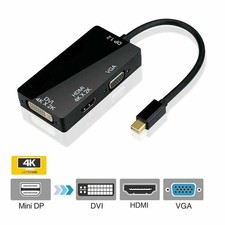
Mini Display Port DP to HDMI VGA DVI Converter For Microsoft Surface Pro 1 2 3 4 Please note it does not support more than one output simultaneously! Features: This product with three output ports, and you can choose one of them to use at a time as you demand, the functions of the port as followings: 1. DVI output, connect the DVI devices using a DVI cable.2. HDMI output, connect the HDMI devices using a HDMI cable.3. VGA output, connect the VGA devices using a VGA cable.4. Mini Display Port, connect Mac Book, Mac Book Pro, or Mac Book Air.Support Mini Display Port 1.1a Dual-mode input.The HDMI can support audio output for iMac (Late 2009) and Mac Book Pro (Mid 2010)Support HDMI/DVI/VGA output with the max resolution of 1920x1080p@60Hz, 225MHz/2.25Gbps per channel (6.75Gbps all channel), 12bit per channel (36bit all channel) deep color.Automatic detect the display by plugging and unplugging it.Powered from Mini Display Port source. Specifications: Size: approx 6.0 x 6.0 x 1.5 cmCable length: 17cmInput Signal: Mini Display Port 1.1aOutput Video: HDMI/DVI/VGAInput: Mini Display Port Male 20pinOutput: HDMI Female Type A 19pinConnector:DVI Female (24+5) VGA Female 15PinVertical Frequency Range: 50/60HzVideo Amplifier Bandwidth: 2.25Gbps/225MHzHDMI/DVI/VGA: 480i/480p,576p,720p,1080i/1080pExternal Power Supply: No external power neededPower consumption (Max): 700mW Notification: Compatible with: - Apple MacBook, MacBook ProYou should assure that if your Mac has one of the following two kinds of port : mini DP port and Thunderbolt port. Not compatible with Thunderbolt 3.(before 2016), MacBook Air, iMac, Mac mini, Mac Pro- Microsoft Surface Pro/Pro 2/Pro 3 for Windows 8 Pro (NOT Surface/Surface 2 for Windows RT)- Lenovo ThinkPad X1 Carbon, X230/240s, L430/440, L530/540, T430/440, T440s, T440p, T530/540p, W530/540, Helix- Dell XPS 13/14/15/17, Latitude E7240/E7440, Precision M3800- Acer Aspire R7/V7-482PG/V7-58- Asus Zenbook UX303LA/UX303LN- Google Chromebook Pixel- Toshiba Satellite Pro S500, Tecra M11/A11/S11 How to USE: The product is easily and conveniently use, with three output ports: DVI VGA HDMI and a Mini Display Port.And you can use one of them at a time as your demand, when you want to use the DVI output, you just need to connect the DVI devices using a DVI cable. And when you want to use the HDMI output, you just need to connect the HDMI devices using a HDMI cable. When you want to use the VGA output, you just need yo connect the VGA devices using a VGA cable.The Mini Display Port meed to connect Mac Book, Mac Book Pro, or Mac Book Air. Package included: 1 x Mini Display Port Thunderbolt to DVI VGA HDMI Adapter cable